Inside Git: How It Works and the Role of the .git Folder

How Git Works Internally?
Git doesn’t track files. it tracks snapshots of content.
Understanding the
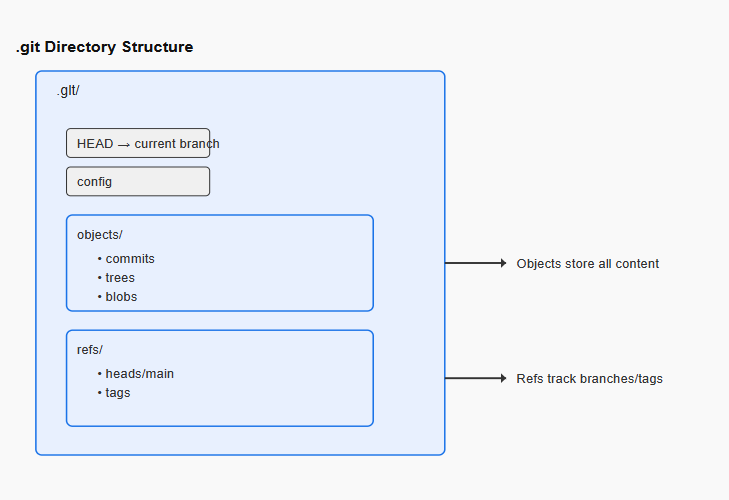
.gitFolder?The
.gitfolder is the Brain of Git. Stores commit, branches, history etc.Git Objects: Blob, Tree, Commit?
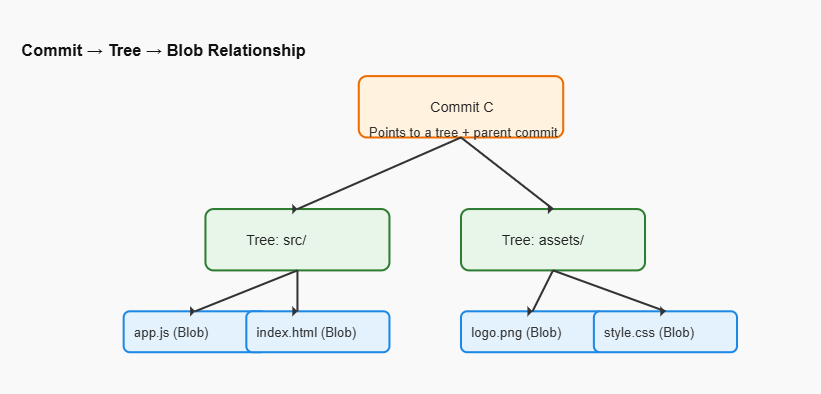
Blob (Binary Large Object): Blob stores file content only, not file name.
Tree: Tree stores folder structure. It links file names to blobs and folders to other trees.
Commit: Commit points to a tree and a previous commit.
How Git Tracks Changes?
Git checks content, not filenames or timestamps. If contents are same then it reuses the old blob.
Structure of the .git directory
Relationship between commits, trees, and blobs
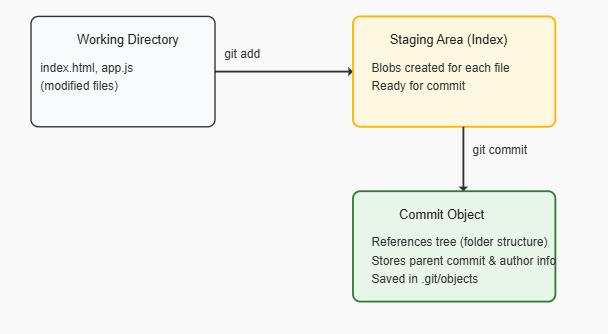
Internal flow of git add and git commit
Summary:
This blog dives into how Git works under the hood, helping beginners build a mental model instead of just memorizing commands. It explains the purpose of the .git folder, the role of Git objects (blobs, trees, commits), and how Git tracks changes using hashes. Through easy-to-understand diagrams, readers learn what happens internally during git add and git commit, making Git’s snapshot-based version control clear and approachable.

