Why Version Control Exists: The Pendrive Problem

The Pendrive Era: How We Used to Work
Before version control systems, developers had painful ways to share code:
The Pendrive Shuffle
You'd copy your code to a pendrive, walk to your teammate's desk, and hand it over. They'd make changes, save it back, and return it. Rinse and repeat.
Email Attachments
"Hey team, attached is the latest version. Please don't edit the old one I sent yesterday!" Spoiler: Someone always did.
The Folder Nightmare
Open any project folder and you'd see:
project_v2.zip
project_final.zip
project_final_ACTUAL.zip
project_LATEST_USE_THIS_ONE.zip
Sound familiar?
The Real Problems We Faced
1. Code Gets Overwritten
Imagine this: You spent 3 hours fixing a bug. Your teammate copied an old version of the file over yours. Your fix? Gone. Forever.
2. No Collaboration History
Someone broke the login feature. But who? When? What did they change? Nobody knows. The file just says "Modified by User" with yesterday's date.
3. Lost Changes
You made changes on Monday. Someone else worked on Tuesday with Friday's version. When you merge the files manually on Wednesday, one of you loses your work.
4. Which Version is Latest?
Is it project_final.zip or project_v2_final.zip? You open both. They look similar. You pick one. It's the wrong one. You waste 2 hours debugging code that was already fixed.
5. Can't Go Back in Time
"Remember that feature we had last week? Let's bring it back." Too bad. That version is lost somewhere in the folder chaos, or worse, overwritten.
Pendrive Chaos vs Version Control
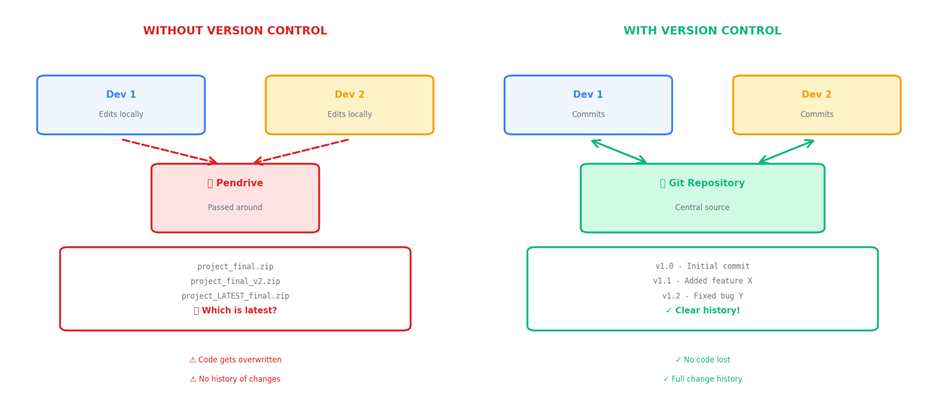
Figure 1: Pendrive Chaos vs Version Control Workflow
On the left: Developers passing pendrives, confused about which file is latest, losing work.
On the right: Everyone works smoothly with a central Git repository, full history, no confusion.
The Collision Problem
Here's the worst scenario:
Monday: You both start with app.js that has a login function.
Tuesday Morning: You add input validation to the login function.
Tuesday Afternoon: Your teammate adds error handling to the same login function, but they started with Monday's version.
Wednesday: One of you copies your version to the shared folder. The other person's work vanishes.
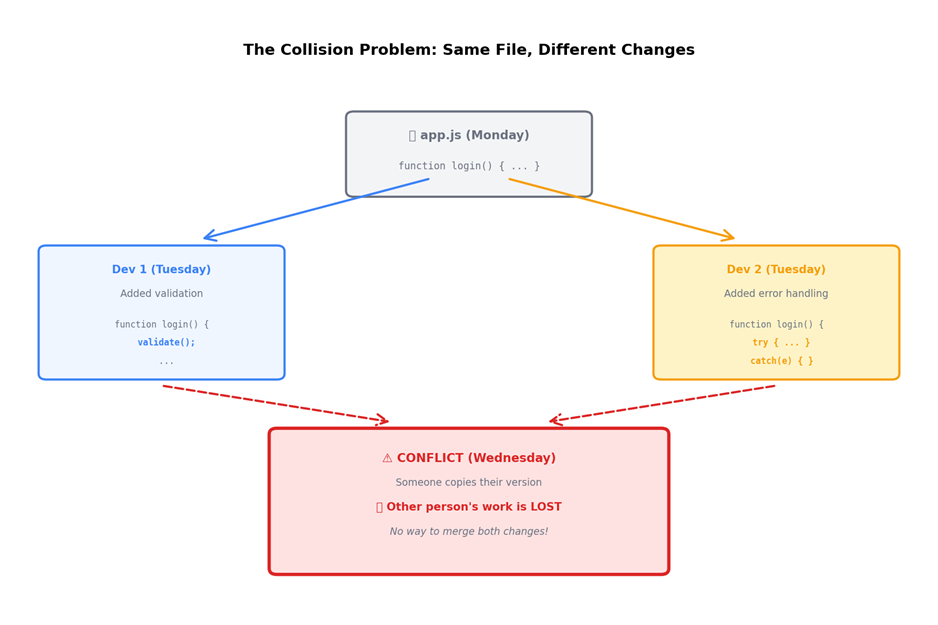
Figure 2: The Collision Problem - Same File, Different Changes
No way to merge both changes. Someone's work is lost. Frustration ensues.
The "Final Version" Nightmare
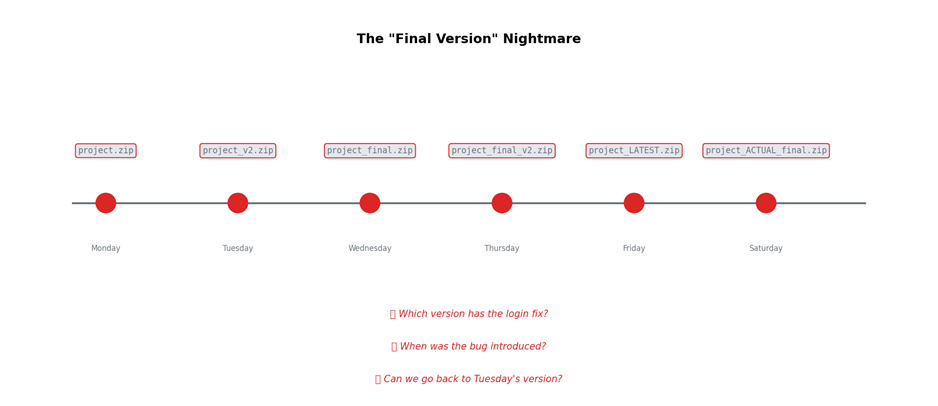
Figure 3: The "Final Version" Timeline
A week in the life of a project without version control:
Monday: project.zip
Tuesday: project_v2.zip
Wednesday: project_final.zip
Thursday: project_final_v2.zip
Friday: project_LATEST.zip
Saturday: project_ACTUAL_final.zip
Questions you can't answer:
Which version has the bug fix?
When was this feature added?
Can we revert to Tuesday's code?
Why Version Control Became Mandatory
Modern development is about speed and collaboration. You can't afford:
Lost code
Confused team members
Hours wasted finding "the right version"
Manual merging nightmares
Version control systems like Git solve this by:
Tracking every change - Know who changed what, when, and why
Enabling parallel work - Multiple developers edit the same files safely
Providing a time machine - Go back to any previous version instantly
Resolving conflicts intelligently - Merge changes without losing work
Creating a single source of truth - Everyone works from the same repository
The Turning Point
The moment Git and platforms like GitHub became mainstream, software development changed forever. Teams went from:
"Did you get my email with the updated file?"
to
"I pushed my changes to the dev branch."
No more pendrives. No more email attachments. No more final_v2 nightmares.
Conclusion
Version control didn't just solve technical problems. It solved human problems:
Confusion
Miscommunication
Lost work
Wasted time

